Definitions
Definitions
Browser (Web Browser):
IP Address (Internet Protocol Address):
Access Point:
Access Point (Wireless Access Point):
An Access Point (AP) is a specialized hardware device used in wireless networking that enables Wi-Fi-capable devices such as laptops, smartphones, tablets, and IoT devices to connect to a wired Local Area Network (LAN). It serves as a bridge between wireless clients and the wired network infrastructure, transmitting and receiving data using radio frequency signals.
Access Points are essential for creating or expanding wireless coverage in various environments, including homes, offices, schools, airports, hospitals, and large public venues. In enterprise and campus networks, multiple access points are strategically placed to ensure seamless connectivity and roaming for users throughout the entire facility.
Although frequently confused with routers, access points perform a different function. A router directs traffic between different networks (like your home network and the Internet), while an access point simply allows devices to connect to the existing local network. Most consumer-grade wireless routers include a built-in access point, but in larger or more complex networks, dedicated access points are installed and managed separately often through a central controller or management platform.
Advanced access points offer features such as:
-
Support for multiple SSIDs (Service Set Identifiers) for guest and internal networks
-
Security protocols like WPA2/WPA3 for encrypted connections
-
Load balancing to distribute connections across multiple APs
-
Power over Ethernet (PoE) support, allowing data and power over a single Ethernet cable
-
Mesh networking capabilities to automatically link and extend coverage without additional cabling
In summary, an Access Point is a critical component in delivering reliable wireless access, especially in environments where a single router cannot provide sufficient coverage.
DHCP (Dynamic Host Configuration Protocol):
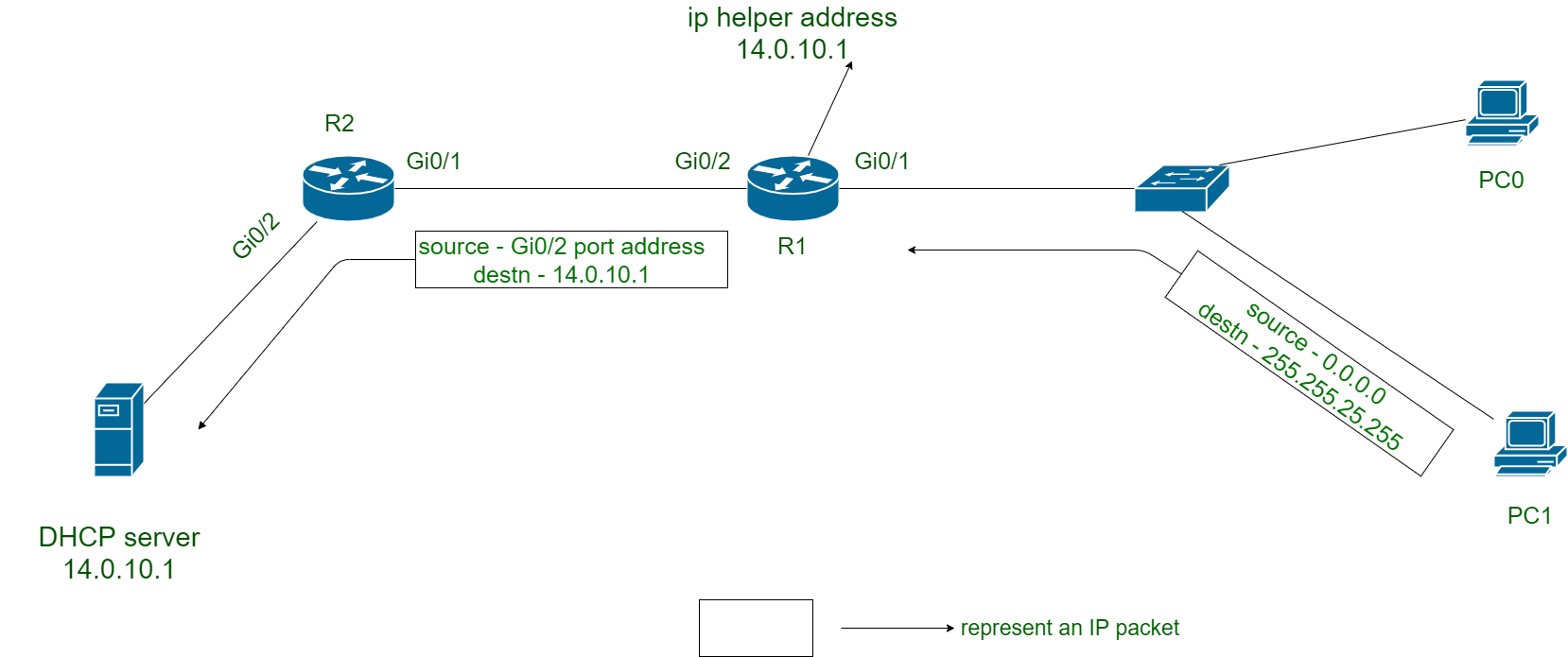 DHCP (Dynamic Host Configuration Protocol):
DHCP is a standardized network management protocol used on IP networks to dynamically assign IP addresses and other necessary configuration settings to devices (clients) on a network. This automated process ensures that devices can communicate efficiently without requiring manual configuration by network administrators.
When a device—such as a computer, smartphone, or printer—connects to a network, it sends a broadcast message requesting configuration information. A DHCP server listens for these requests and responds by assigning the device a temporary IP address along with other network parameters such as:
-
Subnet mask (to define the device’s network range),
-
Default gateway (for routing traffic to other networks, including the Internet),
-
DNS servers (to resolve domain names into IP addresses),
-
Lease time (which determines how long the device can use the assigned IP address before renewal is needed).
The dynamic nature of DHCP greatly simplifies network administration, especially in networks with a large number of devices or frequently changing clients (such as public Wi-Fi or corporate networks). Without DHCP, each device would have to be configured manually a time-consuming and error-prone process.
Key Features of DHCP:
-
Automatic IP address allocation based on predefined rules or pools of addresses.
-
Centralized network management, which improves scalability and consistency.
-
Conflict prevention, ensuring that no two devices are assigned the same IP address.
-
Support for static IP reservations, allowing specific devices (e.g., printers or servers) to always receive the same IP address based on their MAC address.
-
Lease renewal capabilities, which allow clients to extend or release their IP addresses.
Where DHCP is Used:
-
Home networks (usually handled by the home router)
-
Enterprise networks (managed by dedicated DHCP servers or integrated into domain controllers)
-
Internet service providers (to assign IP addresses to customer equipment)
-
Virtualized environments (such as cloud and data centers)
In summary, DHCP is an essential protocol that provides ease of use, efficiency, and scalability in modern IP networks by automating the provisioning of critical network configuration settings to client devices.
DNS (Domain Name System):
The Domain Name System (DNS) is the hierarchical and decentralized system that translates human-readable domain names—such as www.google.com—into numerical IP addresses (like 142.250.190.68) that computers use to locate and communicate with each other over the Internet. It functions like the phonebook of the Internet, allowing users to access websites and online services using memorable names instead of having to remember complex numerical addresses.
Each time you type a URL into your browser, a DNS query is made to determine the IP address associated with that domain. This process is handled by a series of DNS servers, including recursive resolvers, root servers, TLD (Top-Level Domain) servers, and authoritative name servers, which work together to find and return the correct IP address.
DNS improves the usability, efficiency, and scalability of the Internet, and also supports features such as load balancing, failover, and email routing (via MX records). Without DNS, navigating the web would be impractical for most users.
Domain:
A domain is a unique, readable address used to identify and access a specific resource usually a website on the Internet. Instead of having to remember complex numerical IP addresses (like 172.217.15.110), users can simply type in a domain name (like www.google.com) to visit a site. Domains make Internet navigation much more intuitive for people.
A domain consists of at least two parts:
-
Second-level domain (SLD) – This is the part you choose, such as “openai.”
-
Top-level domain (TLD) – This is the suffix, such as .com, .org, .edu, or country-specific codes like .uk, .de, or .jp.
For example, in openai.com, “openai” is the second-level domain, and “.com” is the top-level domain. Together, they form the complete domain name.
Some domain names also include subdomains, which divide a site into different sections or services. For example, blog.openai.com is a subdomain of openai.com.
Domains are registered through certified organizations called domain registrars, and this registration gives a person or organization the exclusive rights to use the domain name for a certain period (usually one year, renewable). The domain system is managed globally by the Internet Corporation for Assigned Names and Numbers (ICANN).
Owning a domain is essential for creating a web presence, whether it's for a business, personal blog, online store, or nonprofit organization.
Firewall:

Hosting:
Hosting is a service that allows individuals or organizations to store and publish their website's files—such as HTML pages, images, videos, databases, and scripts—on a server that is continuously connected to the Internet. This server acts as the physical location where the website "lives," enabling anyone around the world to access it 24/7 by entering its domain name in a browser.
When a user visits a website, their browser sends a request to the hosting server, which responds by delivering the necessary files and data to display the site correctly.
There are several types of web hosting, each offering different levels of performance, storage, control, and cost:
-
Shared Hosting:
Multiple websites share the same server and its resources (CPU, RAM, bandwidth). It’s the most affordable and beginner-friendly option, ideal for small websites or blogs with moderate traffic. -
VPS (Virtual Private Server) Hosting:
A physical server is divided into several virtual servers. Each one acts as an independent environment with its own resources. VPS offers more flexibility and power than shared hosting and is suited for growing websites or businesses. -
Dedicated Hosting:
The client leases an entire server exclusively for their website. This option provides maximum performance, customization, and control, making it ideal for large-scale websites or applications with high traffic and specific requirements. -
Cloud Hosting:
Websites are hosted on a network of interconnected virtual and physical servers (the cloud), ensuring greater scalability and reliability. If one server fails, others take over automatically. This makes cloud hosting suitable for websites with fluctuating or high traffic levels. -
Managed Hosting:
This is a hosting service where the provider takes care of all technical aspects, such as server setup, maintenance, updates, and security. It’s commonly used for platforms like WordPress.
Other key features offered by many hosting providers include:
-
Email accounts linked to the domain.
-
Databases (e.g., MySQL).
-
FTP/SFTP access to upload or download files.
-
Control panels (like cPanel or Plesk) for easier site and server management.
-
Security features like SSL certificates and firewalls.
-
Automatic backups and performance monitoring.
Choosing the right hosting solution depends on factors like website size, expected traffic, technical expertise, budget, and security needs.
HTML (HyperText Markup Language):
HTML is the standard markup language used to create, structure, and present content on the World Wide Web. It provides the basic building blocks of all web pages by organizing content using elements called tags. These tags are enclosed in angle brackets (e.g., <p>, <a>, <img>) and define how different parts of a web page should appear or behave.
HTML structures content into components such as:
-
Paragraphs (<p>)
-
Headings (<h1> to <h6>)
-
Links (<a>)
-
Images (<img>)
-
Lists (<ul>, <ol>, <li>)
-
Tables (<table>, <tr>, <td>)
-
Forms (<form>, <input>, <button>)
-
Multimedia elements (<video>, <audio>)
HTML works closely with:
-
CSS (Cascading Style Sheets): to control the look and feel of a web page—colors, fonts, layouts, spacing, responsiveness, etc.
-
JavaScript: to add dynamic behavior and interactivity such as animations, real-time updates, form validation, and interactive maps.
HTML is not a programming language; it doesn’t include logic, conditions, or loops. Instead, it is a declarative language that defines what content appears on a page and how it is organized.
Some important concepts in HTML include:
-
Elements: The building blocks of HTML, consisting of a start tag, content, and an end tag.
-
Attributes: Provide additional information about elements (e.g., src, href, alt, class).
-
Semantic HTML: The use of tags that clearly describe their meaning (e.g., <article>, <section>, <nav>, <footer>), which improves accessibility and SEO.
-
HTML5: The latest version of the language, which introduced new elements like <video>, <canvas>, <header>, and more, supporting multimedia and modern web applications without relying on external plugins.
<p>, <a>, <img>) and define how different parts of a web page should appear or behave.Paragraphs (<p>)
Headings (<h1> to <h6>)
Links (<a>)
Images (<img>)
Lists (<ul>, <ol>, <li>)
Tables (<table>, <tr>, <td>)
Forms (<form>, <input>, <button>)
Multimedia elements (<video>, <audio>)
CSS (Cascading Style Sheets): to control the look and feel of a web page—colors, fonts, layouts, spacing, responsiveness, etc.
JavaScript: to add dynamic behavior and interactivity such as animations, real-time updates, form validation, and interactive maps.
Elements: The building blocks of HTML, consisting of a start tag, content, and an end tag.
Attributes: Provide additional information about elements (e.g., src, href, alt, class).
Semantic HTML: The use of tags that clearly describe their meaning (e.g., <article>, <section>, <nav>, <footer>), which improves accessibility and SEO.
HTML5: The latest version of the language, which introduced new elements like <video>, <canvas>, <header>, and more, supporting multimedia and modern web applications without relying on external plugins.
HTTP (HyperText Transfer Protocol):
HTTP is the foundational application-layer protocol used for transferring data over the World Wide Web. It defines how messages are formatted and transmitted, and how web servers and browsers (clients) should respond to various requests.
When you visit a website, your browser acts as a client and sends an HTTP request to the web server hosting that website. The server then processes the request and sends back an HTTP response, which includes the content of the requested web page (like HTML, images, videos, etc.) and relevant metadata.
Key Characteristics of HTTP:
-
Stateless Protocol: Each HTTP request is independent. The server does not retain any information from previous requests, which makes it fast and lightweight. However, technologies like cookies and sessions can be used to simulate continuity (e.g., for logins or shopping carts).
-
Methods (Verbs): HTTP uses methods to define the type of action the client wants to perform. Common methods include:
-
GET: Retrieve data from the server. -
POST: Send data to the server (e.g., form submissions). -
PUT: Update existing data. -
DELETE: Remove data. -
HEAD,OPTIONS, andPATCH: Other specialized actions.
-
HTTP vs. HTTPS:
-
HTTPS (HTTP Secure) is the secure version of HTTP. It uses TLS (Transport Layer Security) or the older SSL (Secure Sockets Layer) to encrypt the data transmitted between the client and the server.
-
This encryption ensures that sensitive information (like login credentials, credit card numbers, or personal data) cannot be read or altered by third parties during transmission.
-
Websites using HTTPS display a padlock icon in the browser's address bar, indicating that the connection is secure.
 Other Important Concepts:
-
Status Codes: HTTP responses include a status code that informs the client about the result of the request. Some common codes are:
-
200 OK: The request was successful. -
301 Moved Permanently: The page has been moved to a new URL. -
404 Not Found: The requested page could not be found. -
500 Internal Server Error: The server encountered an error.
-
-
Headers: HTTP messages include headers that carry metadata, such as the type of content (
Content-Type), cache settings, or authentication credentials. -
Content Types: HTTP supports the transfer of various content types, not just HTML. These include JSON (for APIs), XML, images, videos, documents, and more.
Use in Modern Web:
HTTP is also the backbone of modern web services and APIs, including RESTful APIs, which use HTTP methods to enable communication between different software systems.
ISP (Internet Service Provider):
An Internet Service Provider (ISP) is a company or organization that enables individuals, businesses, and other entities to access the Internet. ISPs act as gateways between users and the vast network of interconnected servers, websites, and online services that make up the global Internet.
Core Functions of an ISP:
-
Internet Connectivity: The primary role of an ISP is to provide its customers with a reliable connection to the Internet. This can be achieved through different technologies, such as:
-
DSL (Digital Subscriber Line)
-
Cable Internet
-
Fiber-optic broadband
-
Satellite Internet
-
Mobile data (3G, 4G, 5G)
-
Fixed wireless access
-
-
IP Address Assignment: ISPs assign IP addresses (either dynamic or static) to their customers so that their devices can be identified and located on the Internet.
-
Routing and Network Infrastructure: ISPs operate extensive network infrastructures, including routers, switches, and data centers, to route data packets efficiently across the Internet.
Additional Services Provided by ISPs:
Many ISPs offer more than just Internet access. Some common additional services include:
-
Email accounts with webmail and spam filtering.
-
Web hosting and domain name registration.
-
Technical support for network issues and troubleshooting.
-
VPN services or support for secure connections.
-
Network security solutions, including firewalls, parental controls, and malware protection.
-
TV streaming, VoIP (Voice over IP), and bundled telephone services.
-
Cloud storage and backup solutions for personal or enterprise use.
Types of ISPs:
ISPs vary in size and scope and can be categorized as:
-
Tier 1 ISPs: These are large, global providers that have direct access to the entire Internet backbone and don’t need to pay for peering with other ISPs (e.g., Level 3, NTT, Tata Communications).
-
Tier 2 ISPs: These purchase Internet access from Tier 1 providers and may provide services to local ISPs or businesses.
-
Tier 3 ISPs: These are typically local providers that serve individual customers and small businesses.
Examples of ISPs:
-
Comcast (USA)
-
AT&T (USA)
-
Vodafone (Europe and globally)
-
Verizon, Spectrum, Orange, Telstra, Movistar, and BT are other major ISPs in various regions.
Importance of ISPs:
ISPs are essential for digital inclusion, enabling access to education, communication, remote work, entertainment, and economic opportunities. They also play a role in regulating bandwidth usage, implementing net neutrality policies, and ensuring cybersecurity compliance in their respective countries.
LAN (Local Area Network):
A Local Area Network (LAN) is a type of computer network that is limited to a small geographic area, such as a single home, office, classroom, or building. It is designed to enable communication and resource sharing between computers, devices, and peripherals located in close proximity.
Key Characteristics of a LAN:
-
Limited Range: Typically spans tens to a few hundred meters.
-
High Speed: LANs offer high data transfer rates, commonly ranging from 100 Mbps to 10 Gbps, depending on the technology and infrastructure used.
-
Private Ownership: LANs are usually privately owned and managed by individuals, businesses, or organizations.
-
File Sharing: Devices on a LAN can easily share files and data between each other.
-
Peripheral Sharing: Printers, scanners, and other hardware can be shared among multiple users without needing separate devices for each.
-
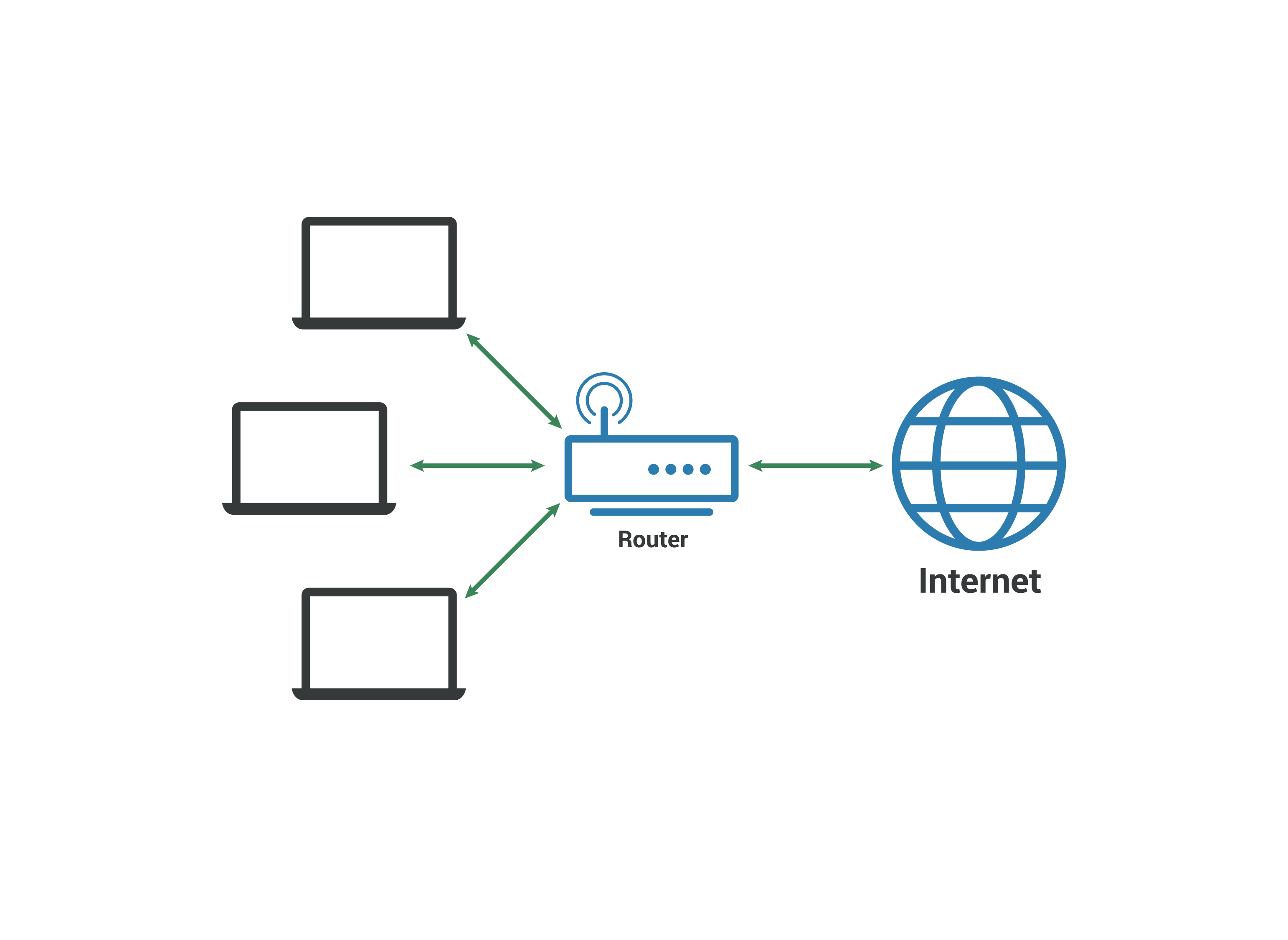
Internet Access Sharing: A single Internet connection can be shared across multiple devices within the LAN.
-
Gaming: LANs are often used for local multiplayer gaming, offering low latency and fast data exchange.
LAN Components:
-
Router or Switch: Manages traffic within the network and connects devices.
-
Access Point (for Wi-Fi): Provides wireless access to the network.
-
Cabling (e.g., Ethernet): Connects devices physically to the network.
-
Computers, Laptops, Smartphones, Printers, Servers: End-user devices that interact within the network.
Types of LAN Connections:
-
Wired LAN: Uses Ethernet cables to connect devices, known for stability and speed.
-
Wireless LAN (WLAN): Uses Wi-Fi (IEEE 802.11 standards) to connect devices without cables, offering flexibility and mobility.
Advantages of a LAN:
-
Cost-Effective: Requires minimal setup for small areas.
-
Efficient Communication: Enables fast, direct communication between devices.
-
Centralized Management: Simplifies backup, security updates, and data control.
Real-Life Examples:
-
A home LAN connects devices like smart TVs, laptops, gaming consoles, and phones to a home router.
-
A school LAN connects classroom computers, servers, printers, and administrative systems.
-
An office LAN allows employees to access shared drives, internal databases, and the company’s intranet.
Comparison with Other Networks:
-
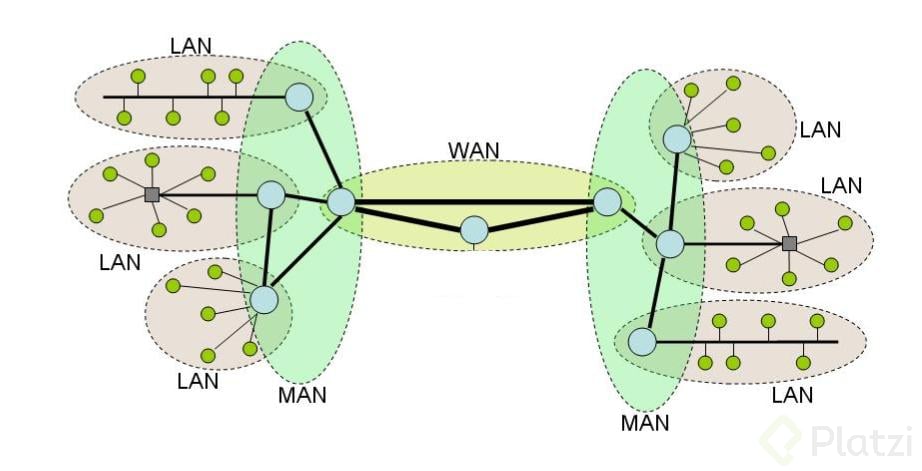
LAN is smaller than a MAN (Metropolitan Area Network) and a WAN (Wide Area Network).
-
A LAN is ideal for confined spaces with a need for rapid data sharing and local collaboration.
 MAN (Metropolitan Area Network):
A Metropolitan Area Network (MAN) is a type of computer network that spans a larger geographic area than a Local Area Network (LAN) but is smaller than a Wide Area Network (WAN). Typically, a MAN covers a city, a large campus, or a group of buildings across a metropolitan region.
Key Characteristics of a MAN:
-
Geographical Scope: Usually extends across a city or a large urban area, ranging from a few kilometers to several tens of kilometers.
-
High-Speed Connectivity: Designed to provide fast data transmission (often using fiber-optic cables), supporting bandwidths sufficient for data, voice, and video communication between locations.
-
Interconnection of LANs: A MAN typically connects multiple LANs to form a larger, cohesive network, enabling devices from separate buildings or campuses to communicate as if they were on the same local network.
Common Uses of a MAN:
-
Universities and Educational Institutions: To connect multiple campuses or departments spread across a city, enabling centralized data management and seamless collaboration.
-
Government Agencies: To link administrative offices, public services (like libraries or police departments), and data centers within a city.
-
Corporations and Businesses: Large companies with offices in different buildings or parts of a city use a MAN to share resources such as databases, applications, and communication tools.
-
Public Utilities and Transportation Systems: Used for managing infrastructure like traffic lights, public Wi-Fi, surveillance cameras, or utility grids.
Technologies Used in MANs:
-
Fiber Optics: For high-speed, high-capacity connections.
-
Microwave or Radio Links: In cases where fiber installation is not feasible.
-
Metro Ethernet: A popular solution that uses Ethernet standards to provide wide-scale connectivity across metropolitan areas.
-
Wireless MAN (WiMAX): Sometimes used for broadband wireless access in urban areas.
Advantages of a MAN:
-
Efficient Communication: Facilitates quick and reliable communication between different locations.
-
Centralized Management: Enables centralized control of resources, security policies, and updates.
-
Cost Efficiency: More economical than separate WAN connections for each location.
-
High Availability: Often includes redundancy and robust infrastructure for reliable service.
Examples:
-
A city government may use a MAN to connect city hall, the police department, libraries, and hospitals on a unified network.
-
A university with multiple campuses across a city may use a MAN to share access to its library systems, learning platforms, and research data.
WAN (Wide Area Network):
A Wide Area Network (WAN) is a large-scale network that spans vast geographical regions—ranging from cities and countries to entire continents. It is designed to connect multiple smaller networks such as Local Area Networks (LANs) and Metropolitan Area Networks (MANs), allowing computers and devices in different locations around the world to communicate and share data.
Key Characteristics of a WAN:
-
Global Reach: A WAN can extend across thousands of kilometers, making it suitable for international and intercontinental communication.
-
Diverse Infrastructure: It utilizes a combination of wired (e.g., fiber optics, coaxial cables) and wireless (e.g., satellite, microwave, cellular) technologies.
-
Multiple Network Types: A WAN connects various types of networks—including corporate LANs, public Internet infrastructure, and cloud systems.
The Internet as a WAN:
The most well-known example of a WAN is the Internet, which interconnects millions of networks globally, enabling email, websites, streaming, cloud computing, and other online services. The Internet operates over both public and private links, using standard protocols like TCP/IP to ensure communication between vastly different systems.
How a WAN Works:
-
WANs use routers, switches, modems, and gateways to direct and manage data transmission between networks.
-
ISPs (Internet Service Providers) and telecommunications providers play a critical role in WANs by offering the infrastructure and services needed to connect remote sites.
-
Communication over a WAN often relies on leased lines, VPNs, MPLS (Multiprotocol Label Switching), or cloud services to ensure data security and performance.
Advantages of a WAN:
-
Remote Connectivity: Enables users and organizations to access and share resources from distant locations.
-
Centralized Data and Applications: Businesses can store data in centralized data centers or cloud services and provide access across branch offices.
-
Scalability: WANs can grow to accommodate thousands or even millions of connected users and devices.
-
Business Continuity: Supports operations, backups, and communication over long distances.
Use Cases:
-
Multinational Corporations: Use WANs to connect headquarters with international branches.
-
Educational Institutions: Connect campuses in different regions.
-
Government Agencies: Maintain secure, interconnected networks across the country.
-
Cloud Services: Provide access to remote storage, software, and computing resources over the Internet.
Technologies Involved:
-
Fiber Optics and Submarine Cables: For high-speed global communication.
-
Satellite and Cellular Networks: For rural or mobile access.
-
VPNs (Virtual Private Networks): For secure communication over public WANs.
-
MPLS and SD-WAN: For performance optimization and traffic management.

SSL (Secure Sockets Layer):
Secure Sockets Layer (SSL) is a cryptographic protocol originally developed by Netscape in the 1990s to provide secure communication over the Internet. Its main purpose is to ensure the confidentiality, integrity, and authenticity of data transmitted between a client (such as a web browser) and a web server. SSL works by encrypting the data during transmission, which prevents third parties from reading or tampering with sensitive information like login credentials, credit card numbers, personal data, and form submissions.
How SSL Works:
SSL operates through a process known as the SSL Handshake, which involves several steps:
-
Client Hello: The browser initiates a secure connection by sending a request to the server along with a list of supported encryption algorithms.
-
Server Hello: The server responds with a digital certificate (issued by a Certificate Authority, or CA) and its chosen encryption method.
-
Authentication and Key Exchange: The client verifies the certificate’s authenticity and agrees on a session key to use for encrypting data.
-
Secure Data Transmission: Once the handshake is complete, encrypted data can be securely exchanged.
SSL Certificates:
To use SSL, websites must install an SSL certificate, which serves two key purposes:
-
Authentication: Confirms that the website is legitimate and that users are communicating with the intended server.
-
Encryption: Enables encrypted communication between the browser and the server.
SSL certificates are issued by Certificate Authorities (CAs), such as DigiCert, Let’s Encrypt, or GlobalSign, and must be renewed periodically.
Transition to TLS:
While SSL was widely used in its early versions (SSL 2.0 and 3.0), it is now considered deprecated due to security vulnerabilities. It has been replaced by TLS (Transport Layer Security), which is more secure and efficient. Despite this, the term "SSL" is still commonly used in web hosting, browser settings, and digital certificates to refer to TLS-based encryption.
Importance of SSL:
-
Data Protection: Prevents eavesdropping and man-in-the-middle attacks.
-
Trust: Modern browsers display a padlock icon in the address bar to indicate a secure HTTPS connection, which is made possible by SSL/TLS.
-
SEO and Compliance: Search engines favor HTTPS-enabled websites, and using SSL is often required for compliance with data protection laws like GDPR and PCI DSS.
Visual Indicators:
-
HTTPS in the URL: The “s” stands for secure.
-
Padlock Symbol: Indicates that the site is using SSL/TLS.
-
Security Warnings: Browsers warn users when visiting sites without valid SSL certificates.
TLS (Transport Layer Security):
Transport Layer Security (TLS) is a widely adopted encryption protocol designed to provide secure communication over the Internet. It is the modern and more robust successor to SSL (Secure Sockets Layer), which is now considered outdated and insecure. TLS is used to protect the integrity, confidentiality, and authenticity of data as it travels between two systems—typically between a web browser and a web server, but also in other forms of network communication like email, instant messaging, and VoIP (Voice over IP).
Key Features of TLS:
-
Encryption:
TLS encrypts the data being sent so that unauthorized users (attackers or eavesdroppers) cannot read it, even if they intercept the transmission. -
Authentication:
TLS verifies the identity of the communicating parties through digital certificates, ensuring users are connecting to legitimate websites or services. -
Data Integrity:
TLS ensures that the data has not been modified during transmission. If any alteration occurs, the communication will fail, protecting users from tampering.
 How TLS Works (Simplified):
-
Handshake:
When a browser or client initiates a connection to a server (e.g., https://example.com), both sides perform a TLS handshake. This process negotiates the encryption algorithms, verifies identities, and establishes a secure session. -
Certificate Verification:
The server presents a digital certificate, which the browser checks against trusted Certificate Authorities (CAs). If the certificate is valid, the connection continues. -
Key Exchange & Session Key Generation:
The client and server exchange information that is used to create a shared secret key. This key is used to encrypt and decrypt all subsequent data. -
Secure Communication:
After the handshake, all communication is encrypted and secure until the session ends.
Versions of TLS:
-
TLS 1.0 and 1.1: Obsolete and no longer considered secure.
-
TLS 1.2: Still widely used and considered secure.
-
TLS 1.3: The latest version, offering improved speed, simplified handshake, and stronger encryption.
Use Cases:
-
Websites (HTTPS): TLS powers the security behind HTTPS (HyperText Transfer Protocol Secure), ensuring safe browsing, online payments, and logins.
-
Email Servers: Encrypts email messages during transmission (e.g., STARTTLS).
-
VPNs: Secures data across public and private networks.
-
Applications and APIs: Used in secure client-server communications.
Benefits of TLS:
-
Protects confidential user data (passwords, credit cards, personal information).
-
Enhances user trust with secure connections (padlock icon and HTTPS).
-
Prevents man-in-the-middle attacks and data tampering.
-
Required for compliance with industry standards like PCI DSS, HIPAA, and GDPR.
TLS vs. SSL:
| Feature | SSL (Deprecated) | TLS (Current Standard) |
|---|---|---|
| Security Level | Lower | Higher |
| Versions Available | SSL 2.0, 3.0 | TLS 1.0, 1.1, 1.2, 1.3 |
| Still in Use? | No | Yes (TLS 1.2 & 1.3) |
| Efficiency | Lower | Higher (faster handshake, better performance) |
Router:
A router is a device that connects different networks and directs data
traffic between them. In a home network, the router connects local devices to
the Internet. Modern routers often include additional functions such as Wi-Fi
access point, firewall, and DHCP server.
Streaming:
Streaming is the real-time transmission of multimedia content (audio, video, games) over the Internet. Instead of downloading the entire file, the content is played as it is received. Platforms like Netflix, Spotify, and YouTube use this technology.
URL (Uniform Resource Locator):
A URL is the complete address typed into a browser to access a resource
on the web. It includes the protocol (http or https), the domain name, and the
path to the resource. For example:
[https://www.example.com/blog/article.html](https://www.example.com/blog/article.html).

VPN (Virtual Private Network):

A VPN is a technology that creates a secure and encrypted connection
over a public network such as the Internet. It is used to protect privacy,
bypass geographic restrictions, and maintain the security of information when
browsing on public networks.
Website:
A website is a collection of related web pages accessible through a
common domain. Each page can contain text, images, videos, links, and forms.
Websites can be informative, commercial, educational, or entertaining.
Wi-Fi:
Wi-Fi is a wireless communication technology that allows devices to
connect to a network without the need for cables. It uses radio waves to
transmit data and is based on the IEEE 802.11 standard. It is widely used in
homes, offices, and public places.
Ethernet:
Ethernet is a widely used networking technology that enables devices to communicate over a wired connection using standardized cables and protocols. It provides a stable, reliable, and high-speed data transmission, making it ideal for environments that require consistent performance and minimal latency, such as offices, schools, data centers, and homes.
Ethernet is commonly used in Local Area Networks (LANs) to connect devices like desktop computers, printers, servers, IP cameras, gaming consoles, and other equipment to network switches, hubs, or routers. It supports various speeds, including Fast Ethernet (100 Mbps), Gigabit Ethernet (1 Gbps), and 10 Gigabit Ethernet (10 Gbps) or higher, depending on the network infrastructure and cable quality.
Ethernet uses twisted-pair cables (such as Cat5e, Cat6, or Cat7) and RJ-45 connectors, and it typically follows the IEEE 802.3 standard. Compared to wireless technologies like Wi-Fi, Ethernet offers greater bandwidth, lower latency, and enhanced security, as it is less vulnerable to interference or unauthorized access.
Shipping Protocol:
"Shipping Protocol" is not a standard term in computer networking, and it is likely a misinterpretation or mislabeling of the concept of a Transport Protocol. In the context of computer networks, a transport protocol is a key part of the Transport Layer in the OSI and TCP/IP models, responsible for managing the delivery of data between devices.
The two most common transport protocols are:
-
TCP (Transmission Control Protocol): Ensures reliable, ordered, and error-checked delivery of data between applications. It is used in applications where accuracy is crucial, such as email, web browsing (HTTP), and file transfers (FTP).
-
UDP (User Datagram Protocol): Offers faster, connectionless communication without error correction. It is often used in real-time applications like online gaming, streaming, and VoIP, where speed is more important than reliability.
Outside of networking, "shipping protocol" might refer to the set of procedures, rules, and data formats used in logistics and supply chain systems to handle the shipment of physical goods. In this context, protocols may define how shipping information (such as tracking numbers, package dimensions, or delivery confirmations) is exchanged between companies, warehouses, and carriers.
In summary, the term "shipping protocol" should be clarified depending on whether it's meant in a technical networking context, where the correct term would be transport protocol, or in a logistics context, where it refers to physical goods handling and data exchange procedures.
source/references:
W3C. (n.d.). Introduction to HTML. World Wide Web Consortium. https://www.w3.org/html/
Cloudflare. (n.d.). What is DNS? Cloudflare. https://www.cloudflare.com/learning/dns/what-is-dns/
TechTarget. (n.d.). What is a firewall? WhatIs.com. https://www.techtarget.com/whatis/definition/firewall
Kurose, J. F., & Ross, K. W. (2020). *Computer networking: A top-down approach* (8th ed.). Pearson.
Only copy-pasted information. No sources for each definition. Missing images in most definitions.
ResponderBorrar